

Which? managed to list 10 Downing Street as holiday accommodation on Booking.com, accept a payment and post a fake 10/10 review.
Despite Booking.com claiming to use advanced AI and multiple security controls, Which? Travel set up the fake listing for the world-famous building in minutes. Under Booking.com’s own policies, hosts are not required to provide photo ID or proof of ownership until three months after a listing goes live.
The latest Which? Travel investigation uncovered systemic security failures across the platform. On 18 June, a Which? researcher listed a property on Booking.com, headlined ‘1 bedroom apartment in the heart of London,’ including the exact address and a photo of the most famous front door in Britain, 10 Downing Street.
The listing was set so users had to request a stay – so nobody could book automatically without being approved. The Which? Travel team opened the booking window very briefly so a Which? representative could do a test booking, and then it was closed again. Within this time, 14 people got in touch to ask if they could stay at the Prime Minister’s home.
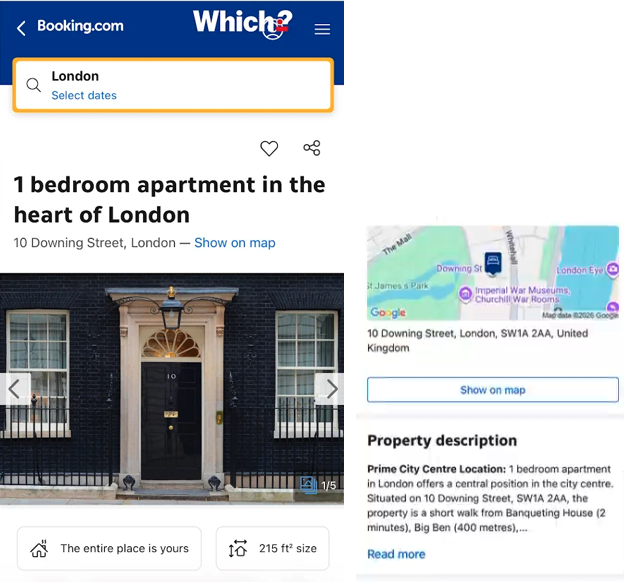
Booking.com processed a payment from a Which? researcher using a different account for a week-long stay at the fake listing. The money has still not been refunded, more than six weeks after it was set up.
The consumer champion then added a fake review on 11 August, giving it 10/10 – ‘exceptional’. After writing the review Booking.com sent a message saying that it would be ‘checked by our team of moderators’ – but the review appeared almost immediately despite obviously being a joke, including a reference to how enjoyable it was hanging out with Larry The Cat.
The listing was not removed until August 27, after Which? had given Booking.com a final opportunity to comment on the investigation.
It sounds funny and it is on the face of it, but 14 people fell for it and tried to make a booking within 20 minutes of the listing going live according to Which? If that can happen to one of the most famous property addresses in the world, it can happen anywhere. It’s no different to a fake holiday listing for an apartment in Edinburgh, Barcelona or Benidorm. AI has made it easier for scammers and more difficult for consumers.
I discussed the story and my tips for avoiding fake holiday listings with Hayley Millar on BBC Radio Scotland Lunchtime Live.
So how do you protect yourself from fake holiday listings and scams?
HOW TO SPOT FAKE HOLIDAY LISTINGS ON WELL-KNOWN BOOKING WEBSITES
A listing on a booking platform is not proof that the property or individual behind it has been independently verified.
Try and see if you can book direct first. You may be able to secure a better deal by cutting out the intermediary. Some properties can only be booked via booking platforms. There’s nothing wrong with that, but carry out some basic checks first.
GOOGLE THE PROPERTY INDEPENDENTLY
Search the property name and address and look for:
- Independent website
- Other booking platforms
- Social media
- Reviews elsewhere on Google Reviews and TripAdvisor
- Contact details
- Inconsistencies in addresses and names
I recently booked accommodation in Liverpool for a reunion with friends. I searched for the property independently and checked it against other information online. It only takes a few minutes.
CHECK GOOGLE MAPS AND STREET VIEW
Put the property address into Google Maps and Street View.
- Does the property actually exist?
- Does it match what the advert claims?
If someone searched 10 Downing Street in the Which? fake listing, they would have quickly found that their proposed holiday apartment came with a famous current occupier (and a cat!).
REVERSE IMAGE SEARCH PHOTOS
Is it listed elsewhere? Scammers can steal photos from genuine holiday lets, estate agents, hotels and social media.
Use Google Lens or Tin Eye – www.tineye.com – to check. Trust your instincts. If it looks suspicious, it probably is.
CHECK REVIEWS
Don’t just look at the high overall rating. The property I booked in Liverpool scored over 9/10 overall and is rated as exceptional, but scores can be manipulated.
A glowing 10/10 review speaking about how enjoyable it was to hang out with Larry the cat sounds great too, but it obviously wasn’t genuine.
- Sort reviews by newest
- Read the poor reviews
- Look at how far back reviews go
- Check for sudden clusters of reviews
- Look for generic and repetitive wording with scant reviews – does it sound plausible and genuine?
- Does the property host reply to reviews?
A new listing with no track record isn’t necessarily fraudulent, but it’s something else to check.
COMPARE PRICES
If similar properties are £200 a night and someone is offering identical accommodation at £60 a night, ask yourself why?
If it sounds too good to be true, it probably is.
THE SCAM WITHIN THE SCAM – PAYMENT MESSAGES
A message sent or received through an app or booking platform doesn’t mean the message is genuine.
Despite only setting themselves up as a host that same day and the listing being an obvious fake, the Which? Travel team were able to use Booking.com’s own mailing system to send an external URL asking the Which? representative from the other account to enter credit card details to confirm the booking. While competitors like Airbnb automatically block external web links in messages to protect users from phishing scams, Booking.com failed to intercept the link.
Booking.com told Which? that it has the ability to block URLs being sent through the messaging system, if it suspects fraudulent activity. But it didn’t do so in this case.
If you suddenly receive a message saying:
- “There’s a problem with your payment”
- “Your booking will be cancelled”
- “Verify your card within 24 hours”
- “Click here to confirm your booking”
Treat is as suspicious. Don’t think, “the message came through the genuine booking app so it must be ok.”
Never click on the link in the message or use the phone number they give you.
Go to the app or website independently or find the genuine contact details separately to check and verify it.
HOW SHOULD I PAY FOR HOLIDAY ACCOMMODATION?
Always try to book direct or through a reputable travel agent and read the terms and conditions carefully before you pay.
If there’s anything you’re not sure of, ask, and get any verbal promises confirmed in writing as evidence in case any disputes arise afterwards.
Booking direct gives you a clear contract with the business and makes it easier to enforce your consumer rights.
Third-party booking sites act as intermediaries between you and the accommodation provider. This can complicate Section 75 protection under the Consumer Credit Act 1974 for purchases over £100 and up to £30,000, as involving an intermediary may break the debtor-creditor-supplier relationship required to hold your credit card provider jointly liable if things go wrong.
Be suspicious if a provider only offers cash, bank transfer (often called ‘Faster Payment’ or ‘Pay by Bank’) or ‘friends and family’ option on PayPal as payment options. Fraudsters often insist on this because it’s almost impossible to get your money back and you cannot make a chargeback to dispute a transaction.
CHARGEBACK
Chargeback is a voluntary scheme banks subscribe to, which allows your bank to claw back money from the retailer’s bank on disputes. You have a 120-day time limit for debit and credit cards, with no value restrictions.
If the purchase is for accommodation in the future, the 120-day limit starts from the day the booking would start.
The transaction will be temporarily reversed, and the retailer will be given an opportunity to defend it. You need to stress ‘breach of contract’ on chargebacks as they are often declined on the first attempt.
I HAVE CLICKED A LINK AND ENTERED MY CARD DETAILS – WHAT SHOULD I DO?
Contact your bank or card provider immediately.
Use a trusted telephone number – this may be on the back of your card. You can also dial 159 to contact your bank.
- Cancel your card
- Check transactions
- Change passwords (if you have used the same password elsewhere – change that too)
- Enable two-factor authentication
- Keep screenshots and messages
- Report the account and listing to the booking platform
I HAVE LOST MONEY ON A FAKE HOLIDAY LISTING – CAN I GET IT BACK?
If you paid by debit or credit card, try to make a chargeback as soon as possible to dispute the payment.
If you paid by bank transfer, all is not lost. Contact your bank immediately and say you have been tricked into making the payment and believe you have been the victim of an authorised push payment (APP) scam.
These protections started on 7 October 2024 and apply to payments made on or after this date.
There is an optional £100 excess deduction that banks can apply to your refund. The maximum amount you can claim is £85,000, which will cover over 99% of claims. This £100 excess cannot be applied to vulnerable consumers.
You can expect to be reimbursed within 5 business days of making your claim.
I HAVE ARRIVED AND THE ACCOMMODATION DOESN’T EXIST
Your first priority is finding somewhere safe to stay.
- Take photos of the address and location
- Screenshot the listing before it disappears
- Keep all booking confirmations and messages
- Contact the booking platform immediately
- Contact your bank or card provider and tell them you have been scammed
If you are stranded and have to book somewhere else, keep receipts for reasonable replacement accommodation and other necessary expenses so you can pursue reimbursement through the booking platform.
Create a paper trail. Don’t rely solely on telephone conversations.
WHERE DO I REPORT HOLIDAY BOOKING FRAUD?
England, Wales and Northern Ireland
Report Fraud – online or 0300 123 2040
Scotland
Police Scotland – online or 101
Reporting the fraud does not replace contacting your bank.
If you have lost money or had your banking details compromised, contact your bank immediately as well.
SHOULD I COMPLAIN TO BOOKING.COM
If problems arose through the platform:
- Report the listing
- Complain in writing
- Keep screenshots
- Retain booking / payment confirmations
- Ask for a clear written outcome
- Keep receipts for losses
- Escalate unresolved complaints
Although Booking.com expressly say the accommodation contract is with the service provider and they are the intermediary, you need to deal with Booking.com because this is who you paid the money to.
You didn’t pay the money direct to the accommodation provider. They may say you accepted the terms and conditions and say otherwise, but don’t be fobbed off.
RORY BOLAND, EDITOR OF WHICH? TRAVEL SAID:
“If Booking.com’s so-called sophisticated AI systems can’t spot that 10 Downing Street is not a holiday rental, then it’s no wonder scammers can exploit the platform so easily. It would be laughable that we were able to list the UK’s most famous address for rent, if the consequences weren’t so devastating for holidaymakers, who risk losing thousands of pounds to bogus listings and phishing links.
“Booking.com’s checks are clearly unfit for purpose, and the Prime Minister must now urge Ofcom to use the Online Safety Act to crack down on irresponsible online platforms that leave consumers wide open to fraud.”
SHOULD I STOP USING BOOKING PLATFORMS?
No, but be careful and don’t take everything at face value.
Millions of legitimate accommodation bookings are made through online platforms, but you can’t rely on them to vet and confirm that the booking is genuine.
I use booking sites to search for accommodation that ‘ticks the boxes’ and try to book direct wherever possible. You can often secure a better deal by cutting out the middle-man (intermediary) and it gives you a clear direct contract. This makes it easier to enforce your consumer rights if anything goes wrong.
Consumers should make reasonable checks, but booking platforms have responsibilities too. This Which? fake booking wasn’t a sophisticated fake villa hidden away at an obscure address. It was 10 Downing Street – one of the most famous addresses in the world.
If systems designed to detect fraud can’t immediately identify one of the most famous addresses and front doors in the world as a bogus holiday let, consumers are entitled to ask how effectively they will identify a fake holiday let anywhere in the world.
Have you been caught out by a fake holiday listing? What was the outcome?
